Contact us
We are just a click or call away - personal, direct and uncomplicated.

+49 611 711857-0

hallo@denkform.net

Zanggasse 6
65719 Hofheim am Taunus

Monday to Thursday 8:00-17:00 and Friday 08:00–15:00


Jamf - The comprehensive Apple Device Management
Jamf is the world's leading MDM platform for Apple devices – and Denkform is your partner for licensing, implementation and ongoing operations. Whether it's ten MacBooks in a creative studio or a thousand iPads in a school environment: we set up Jamf, integrate it into your existing IT infrastructure and remain your point of contact throughout. You don't need to master a complex platform – that's what we're here for.

1
Jamf Now - Simple MDM for small businesses
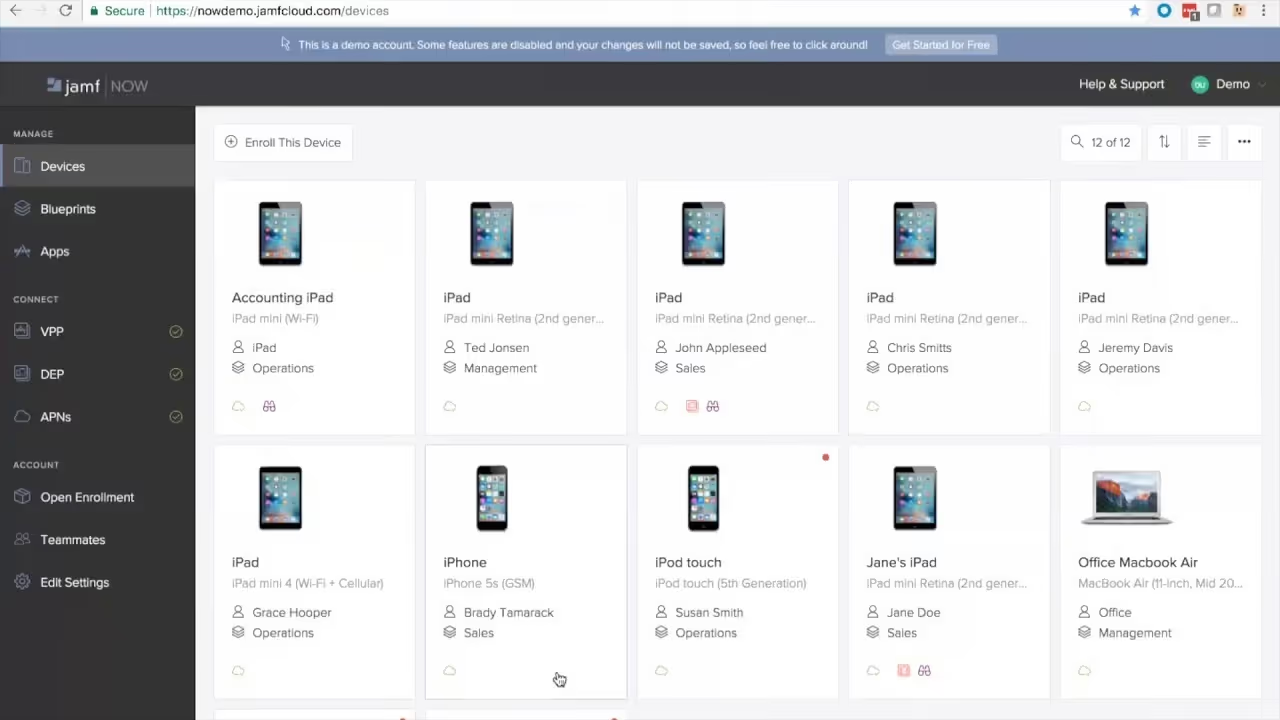
Jamf Now is aimed at small businesses and teams that want to manage their Apple devices professionally – without requiring a dedicated IT department or deep technical expertise. The cloud-based interface makes it possible to enrol MacBooks, iPhones and iPads within minutes, distribute apps and set basic security policies. Wi-Fi profiles, password policies and remote wipe can all be configured with just a few clicks.
Jamf Now is the ideal entry point into Apple Device Management – and can be upgraded to Jamf Pro at any time as requirements grow. Denkform supports you through both scenarios.
2
Jamf Pro - Central administration for large companies
Jamf Pro is the enterprise solution for organisations that want to run their Apple fleet in a fully automated and secure way. New devices are configured via zero-touch deployment directly from Apple Business and shipped to employees – without the IT team needing to physically handle each device. Software distribution, patch management, security policies and compliance reporting all run centrally through a single platform.
Jamf Pro particularly excels in Apple-first or mixed environments alongside Microsoft Intune: it integrates with Azure Active Directory, Okta, SCIM directories and existing SIEM systems. Denkform handles the setup, integration into your infrastructure and trains your IT staff in the productive use of the platform.
- Zero-touch deployment – Ship devices directly to employees, pre-configured and ready to use
- Automated app distribution – Managed apps from the App Store or as in-house packages
- Security policies & compliance – Password policies, encryption and MDM profiles enforced centrally
- Detailed device inventory – Hardware, software, certificates and configuration status at a glance
- Self-service portal – Employees install approved apps themselves, without an IT ticket
- Full macOS & iOS integration – Unified management across all Apple platforms
- Third-party integration – Connect to Azure AD, Okta, ServiceNow, Splunk and more
- BYOD management – Securely integrate personal devices into the corporate environment
3
Jamf School - Especially for educational institutions
Jamf School was built from the ground up for education – and it shows. Teachers can control student devices directly during lessons through a simplified interface: launch apps, lock screens, restrict websites or focus students on a specific learning programme. The school's IT administration retains full oversight of all devices, can roll out profiles across entire classes and assign customised permissions to teachers or parents.
For schools procuring iPads as part of digital education funding programmes, Jamf School is the recommended management solution. Denkform advises educational institutions on procurement, licensing and the complete rollout – from the first iPad to a fully operational classroom environment.

4
Jamf Protect - Security for macOS endpoints
Conventional endpoint security solutions are built for Windows and ported to macOS as an afterthought – with corresponding compromises in performance and detection accuracy. Jamf Protect was built natively for macOS and uses Apple-native frameworks such as Endpoint Security to detect threats precisely without slowing down the system.
Jamf Protect monitors system processes in real time, detects behavioural anomalies and can respond automatically when needed. For organisations with compliance requirements (ISO 27001, SOC 2, GDPR), it delivers detailed audit logs and telemetry data that can be fed into existing SIEM systems such as Splunk or Microsoft Sentinel. Denkform assists with configuration, rule sets and ongoing monitoring.
5
Jamf Connect - Seamless identity management
In modern enterprise environments, Active Directory is increasingly being replaced by cloud-based identity providers such as Okta, Microsoft Entra ID (Azure AD) or Google Workspace. Jamf Connect bridges the gap between these cloud identities and the macOS login – employees sign in to their Mac with their existing corporate credentials, without requiring a local AD binding.
This not only simplifies IT administration significantly but also increases security: accounts can be centrally disabled, passwords synchronised and access rights controlled granularly – including for remote employees. Jamf Connect is particularly valuable for organisations moving towards a fully cloud-based IT infrastructure or in the process of decommissioning Active Directory.
- Increased security
- Single Sign-On
- Fast application access
Frequently asked questions
How does Jamf School support educational institutions?
Jamf School was developed specifically for the needs of schools and offers:
- Central device management: Teachers can configure student devices, provide apps and define access rights.
- Classroom management: ways to control devices during lessons to ensure student focus.
- Security functions: Protecting student data and ensuring a safe digital learning environment.
What security features does Jamf Protect offer?
Jamf Protect provides the following security features for macOS devices:
- Malware protection: detection and blocking of malware in real time.
- Threat detection: Identification of unusual activities and potential security risks.
- Compliance monitoring: Ensuring that devices comply with the defined security guidelines.
How does Jamf Connect make identity management easier?
Jamf Connect makes it possible:
- Single sign-on: Users can log in with their cloud identities (e.g. Okta, Microsoft Azure) on Mac devices.
- No need for Active Directory: No need for traditional Active Directory binding, which simplifies the IT infrastructure.
- Centralized access management: IT administrators can control access rights and authentication policies centrally.
Can Jamf be integrated into an existing Windows or Microsoft 365 environment?
Yes. Jamf Pro and Jamf Connect integrate directly with Microsoft Entra ID (Azure AD), Intune, and Microsoft 365. This allows Apple devices to be integrated into a mixed Windows/Apple environment without having to set up a separate infrastructure. Denkform has experience with precisely these types of hybrid deployments.
Does Denkform also take over ongoing operations and support after the Jamf setup?
Yes. Many of our customers hire us not only for the initial implementation, but also for ongoing operations: license management, updates, enrolling new devices, policy adjustments, and support in case of problems. Talk to us about a suitable support model.