Get in touch
We are just a click or a call away – personal, direct and uncomplicated.

+49 611 711857-0

hallo@denkform.net

Zanggasse 6
65719 Hofheim am Taunus

Monday to Friday 8:30–13:30 and 14:30–17:00 (Friday until 15:30)

NinjaOne MDM – Mobilgeräte und Endpunkte in einer Konsole
Android- und Apple-Geräte dort verwalten, wo Ihr Team ohnehin Windows, macOS und Server betreut – ohne zusätzliches Werkzeug und ohne zweite Oberfläche. Wir richten NinjaOne ein, binden Ihre Geräte an und übernehmen den laufenden Betrieb.
1
Ein Werkzeug statt fünf
In vielen IT-Abteilungen ist die Werkzeugsammlung über Jahre gewachsen: ein System für Fernwartung, eines für Patches, eines für die Inventarisierung, ein weiteres für Mobilgeräte. Jedes mit eigener Anmeldung, eigener Logik und eigenen Lücken.
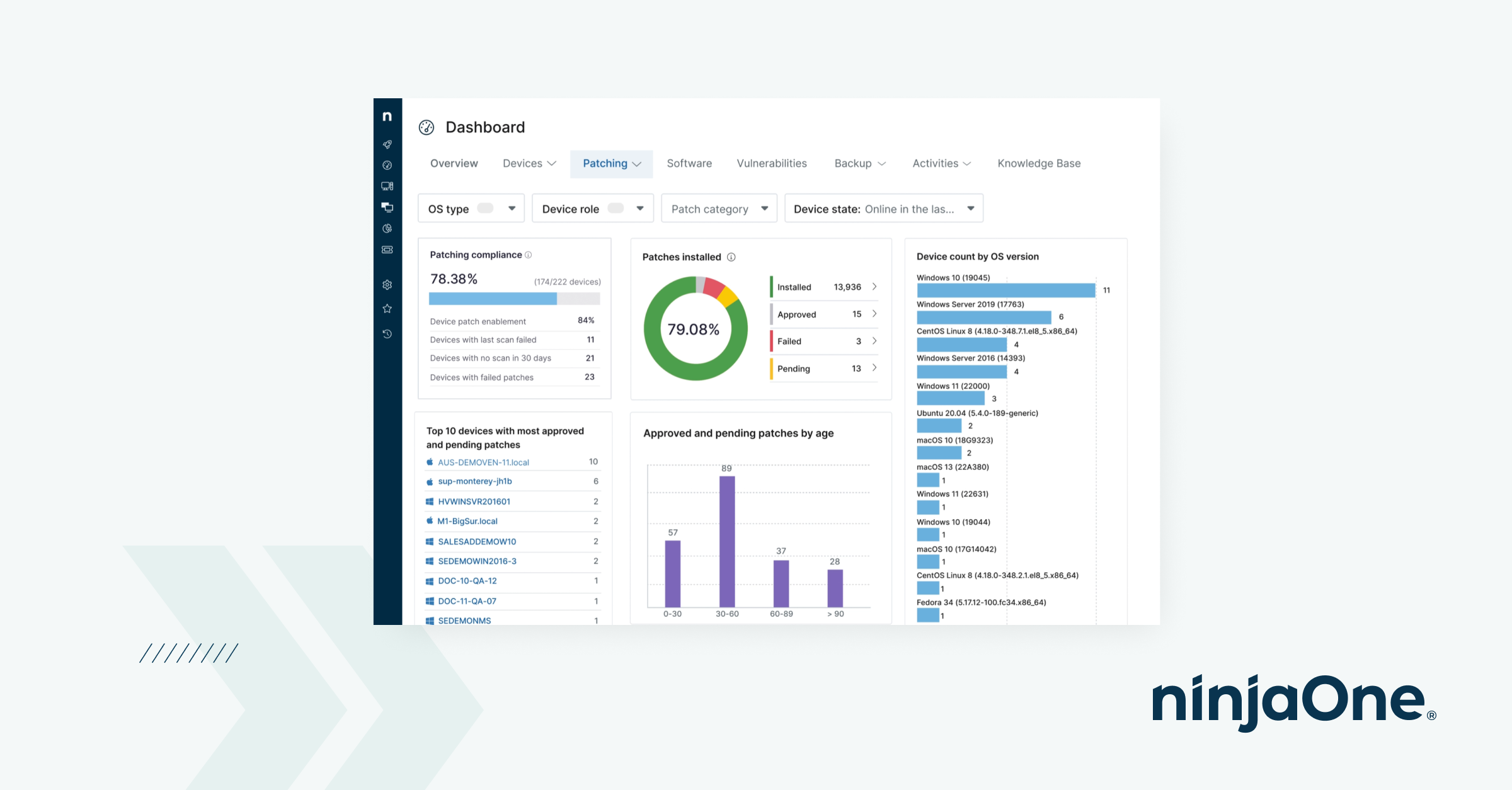
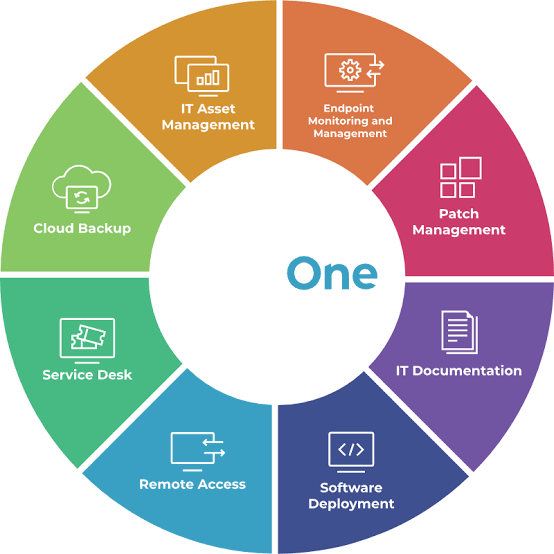
NinjaOne setzt an dieser Stelle an. Endpunktverwaltung, Fernzugriff, Patch-Management, Backup und Mobile Device Management laufen über dieselbe Plattform – Smartphones und Tablets erscheinen neben Notebooks, Servern und virtuellen Maschinen in einer gemeinsamen Übersicht.
Für Ihr Team bedeutet das: weniger Kontextwechsel, eine Einarbeitung statt fünf und ein Bild vom Gerätebestand, das tatsächlich vollständig ist.
2
Mobilgeräte sicher im Griff
Ein verlorenes Smartphone ist selten das eigentliche Problem – die Unternehmensdaten darauf sind es. NinjaOne MDM stellt die Werkzeuge bereit, um im Ernstfall innerhalb von Minuten zu reagieren, und im Normalbetrieb dafür zu sorgen, dass der Ernstfall selten eintritt.
- Remote-Aktionen – Geräte aus der Ferne sperren, zurücksetzen oder den Passcode erneuern
- Geräterichtlinien – Vorgaben zu Verschlüsselung, Passcode und Nutzung im gesamten Bestand durchsetzen
- App-Verwaltung – Anwendungen zentral installieren, entfernen oder blockieren
- Trennung privat/geschäftlich – Unternehmensdaten auf BYOD-Geräten schützen, ohne den privaten Bereich anzutasten
- Kiosk-Modus – Geräte auf eine oder mehrere Apps beschränken, etwa für Kasse, Lager oder Digital Signage
- Geolokalisierung – Standortdaten für Inventur und Verlustprävention
- Fernsupport – direkter Zugriff auf den Gerätebildschirm zur Diagnose
3
Schnell startklar – Zero-Touch statt Handarbeit
Geräte einzeln einzurichten kostet Zeit, die niemand hat. NinjaOne bindet Android- und Apple-Geräte über die Zero-Touch-Verfahren der Hersteller ein: Das Gerät wird ausgepackt, meldet sich selbst an und ist konfiguriert, bevor es beim Mitarbeiter ankommt.
- Automatisierte Registrierung – über Apple Business Manager und Android Zero-Touch
- Richtlinienvorlagen – einmal definieren, auf beliebig viele Geräte anwenden
- Unternehmenseigene und private Geräte – beide Betriebsmodelle parallel abbildbar
- Vollständiges Inventar – Hardware, Betriebssystemstand und installierte Apps in Echtzeit
- Gemeinsame Übersicht – Mobilgeräte neben Windows, macOS, Linux, VMs und Netzwerkgeräten
- Kurze Einarbeitung – aufgeräumte Konsole, Schulung und Support sind im Produkt enthalten

4
Warum Teams zu NinjaOne wechseln
NinjaOne ist in den vergangenen Jahren stark gewachsen und verwaltet nach eigenen Angaben über 14 Millionen Endpunkte bei rund 40.000 Kunden in mehr als 140 Ländern. Im G2-Winterbericht 2026 wird die Plattform als Leader im Bereich Mobile Device Management geführt, mit besonders guten Bewertungen für Administrierbarkeit und Benutzerfreundlichkeit.
Entscheidend ist in der Praxis aber selten das Ranking, sondern die Frage, ob eine Lösung im Alltag trägt. Genau das prüfen wir mit Ihnen anhand Ihrer Gerätelandschaft – und sagen es Ihnen auch, wenn eine andere Plattform besser passt.
5
Einführung & Betrieb durch Denkform – von Anfang bis Ende
Eine Plattform zu lizenzieren ist der einfache Teil. Den Nutzen bringt sie erst, wenn Richtlinien, Automatisierung und Abläufe zu Ihrem Betrieb passen. Dabei begleiten wir Sie.
- 01 – Analyse & Konzept: Wir erfassen Ihre Gerätelandschaft und die bestehenden Werkzeuge und klären, was NinjaOne davon ablösen kann.
- 02 – Einrichtung & Konfiguration: Wir richten die Plattform ein, verbinden sie mit Apple Business Manager und Android Zero-Touch und legen Richtlinien und Vorlagen an.
- 03 – Migration & Enrollment: Bestehende Geräte werden schrittweise übernommen, neue Geräte laufen automatisiert in die Verwaltung.
- 04 – Schulung & laufender Support: Wir schulen Ihr Team, dokumentieren die Einrichtung und bleiben für Erweiterungen und Alltagsfragen ansprechbar.
- Werkzeug-Konsolidierung – mehrere Einzellösungen durch eine Plattform ersetzen
- Planbare Kosten – ein Vertrag statt mehrerer Lizenzmodelle nebeneinander
- Schnelle Einarbeitung – gerade für kleine IT-Teams ohne eigene MDM-Spezialisten
- Gemischte Landschaften – Windows, macOS, Linux, Android und Apple-Mobilgeräte gemeinsam
- Ehrliche Einordnung – bei reinen Apple-Umgebungen empfehlen wir Jamf, bei Datenschutz-Schwerpunkt Relution
Frequently asked questions
Eignet sich NinjaOne auch für kleine IT-Teams?
Ja, gerade dafür. Die Konsole ist bewusst schlank gehalten, die Einarbeitung kurz, und Schulung sowie Support sind im Produkt enthalten. Für Teams ohne eigene MDM-Spezialisten ist das ein wesentlicher Vorteil.
Können private Geräte eingebunden werden?
Ja. Unternehmenseigene und private Geräte lassen sich parallel abbilden. Auf BYOD-Geräten werden ausschließlich die geschäftlichen Daten verwaltet und geschützt, der private Bereich bleibt unangetastet.
Lässt sich NinjaOne mit bestehenden Systemen verbinden?
Ja. Die Plattform bietet Anbindungen an gängige Systeme, unter anderem Microsoft Intune, CrowdStrike, SentinelOne, Okta und ServiceNow. Welche davon in Ihrem Fall sinnvoll sind, klären wir in der Analysephase.
Was ist der Unterschied zu Jamf oder Relution?
Jamf ist auf Apple spezialisiert und dort am tiefsten, Relution punktet mit deutschem Hosting und DSGVO-Konformität. NinjaOne ist die richtige Wahl, wenn Sie Mobilgeräte und klassische Endpunktverwaltung in einem Werkzeug zusammenführen wollen. Wir ordnen die drei Optionen für Ihre Situation ein.
Welche Geräte kann NinjaOne verwalten?
Android- und Apple-Mobilgeräte sowie Windows-, macOS- und Linux-Rechner, Server, virtuelle Maschinen und Netzwerkgeräte – alles über dieselbe Oberfläche. Das ist der zentrale Unterschied zu reinen MDM-Lösungen.